
Windows 8.1 Preview came with a handful of new features that made it easier for desktop users to use the OS, including boot to desktop, combustibility of the start screen to appeal for the desktop usage scenario, and better multitasking. Windows 8.1 RTM adds to the list. Thanks to our friends at Into Windows for discovering this feature.
In Windows 8.1 RTM, Microsoft added the ability to return straight to the desktop after closing metro apps. Currently, if you close all metro apps on screen, you will be taken back to the start screen. In Windows 8.1, you have the option to set it so that once every metro app on a monitor is closed, you are automatically taken back to the desktop. This is useful if you use the desktop primarily and open metro apps once in a while. A good scenario is that you double click on a photo on File Explorer and are taken to the Photos app. Once you close the photos app, you will be returned back to File Explorer; neat!
You set this option from the navigation tab in the Task Manager properties, the same place you set the boot to desktop. Here’s a picture (via Into Windows).
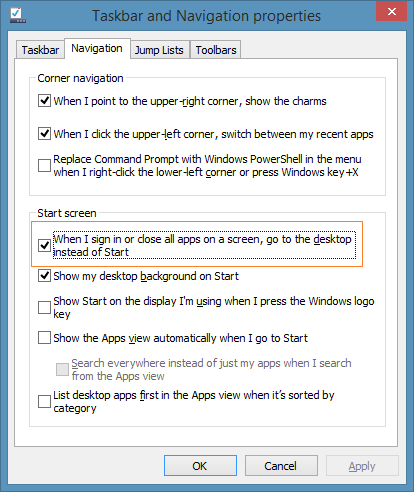
Source: Into Windows
Related articles
- Touring through the final Windows 8.1 (windowssecrets.com)
- Windows 8.1 May Have Featured App Showcase on the Start Screen (mcakins.com)
- Windows 8 delivers the goods on benchmarks (reviews.cnet.com)
- Microsoft Updates the Start Button in Windows 8.1 RTM – Screenshot (news.softpedia.com)





5 responses to “Windows 8.1 RTM Adds A New Desktop Friendly Feature Since the Preview”
[…] McAkins Online notes, the new option can be easily enabled by right-clicking the Taskbar, hitting […]
LikeLike
[…] 根据McAkins Online的报道,用户在Windows 8.1 RTM桌面模式的任务栏空白处可以右击鼠标调出一个“属性”选项菜单。这里有几个选项卡,其中包括一个“导航”选项卡,点击之后会出现几个复选框让你根据自己的喜欢进行复选。 […]
LikeLike
[…] 根据McAkins Online的报道,用户在Windows 8.1 RTM桌面模式的任务栏空白处可以右击鼠标调出一个“属性”选项菜单。这里有几个选项卡,其中包括一个“导航”选项卡,点击之后会出现几个复选框让你根据自己的喜欢进行复选。 […]
LikeLike
[…] The change is another improvement that Microsoft has integrated into Windows 8.1 that makes life easier for desktop / non-touch users. (via McAkins) […]
LikeLike
[…] The change is another improvement that Microsoft has integrated into Windows 8.1 that makes life easier for desktop / non-touch users. (via McAkins) […]
LikeLike