
We are back with another app feature! Sorry for the lack of posts recently. I, myself, have been busy for the last several days; so I had to put off publishing for the time being. However, if you are following @Mcakins on twitter, we still frequently update you with new apps for you to check out. So do follow us on twitter to stay posted. Now, without further ado, let’s get to business.
Format Converter X is a very neat little utility that might come in very handy if you work with any sort of multimedia files, like audio, music, and video. Of course, if you are working on a media project, like a home movie, you might need to convert audio or video from one format to another. However, this app can come in handy for even simply and daily tasks. For example, if you have an audio file in WMA format, and your friend’s Mac computer can only read MP3 files, you can use this app to easily convert the file and email it to her.
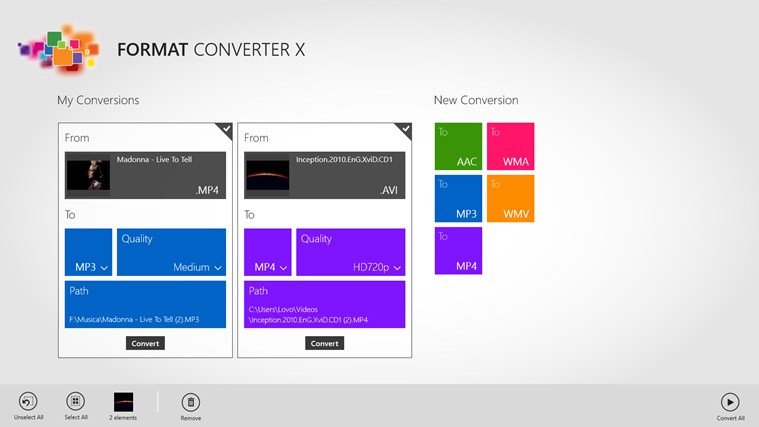
Here’s the app description and some screenshots. Enjoy!
Description
This App can Convert Video or Audio files in other formats.
You can convert a file in few simple steps maintaining or decreasing its quality, or for example you can extract the audio of a video..
In addition, when each operation will be completed, you’ll be noticed with a toast notification!Advertising can be removed through the settings menu.
Saving formats:
MP4, MP3, WMV, WMA, AACSource formats:
MP4, MP3, WMV, WMA, AAC, AVI, MPG, MPEG, MOV, WAV, M4V, M4A, AC3, PCMNB. At the moment the App can’t support other formats because Windows 8 supports H264, MPEG2, WMV3, WVC1, AAC, AC3, MP3, MPEG, PCM, WMA8 and WMA9 codecs.
What’s included
Features
Make conversions in background!
Really Easy!
Manages snapped mode
Toast notifications when a conversion ends


 McAkins Online